How Can We Help?
Search for answers or browse our knowledge base.
-
Getting Started
-
FAQs
- Botox FAQ
- Roles & Responsibilities
- Nutrition For Oral Health
- Weekly Reports
- Weekly Report Text Reminder
- Upset Patient Protocol
- Informed Consent for Appointment Confrimation
- Dr. Bracci Scheduling Guidelines
- Implant Bundle Flyers
- Prophylactic Pre-Med Guidelines
- Protocol for Cardiac Patients
- Protocol for Pregnant Patients
- Loupes and Lights!
- Core Values – Printable!
- Victor Smiles
- IO Molecular Iodine Mouthwash FAQ
- CE Requirements for staff
- Revenue Cycle Workflow Steps
- Back to The Basics Weekly Messages
- VIP Guidelines – Patients Presenting Insurance During a VIP Term
- Traditional Denture Updated Option 1 Replacement Teeth Poster
- Medical Emergency Training
- Show Remaining Articles (7) Collapse Articles
-
Open Dental
- Open Dental Tasks
- Moving X-Rays Between Patients in Apteryx
- How to print Chart Notes in Open Dental
- FLDC Calibration Document!
- Setting Orthodontic Time Frame in Open Dental
- Flex Online Scheduling Setup
- IO Camera Capture Button Doesn't Work?
- How to Enter a Pre-Determination into Open Dental
- Open Dental Scanner Settings
- Email CT's from Apteryx
- XVCapture (Apteryx) Forward Images Failure
- Removing Medications from a Chart
- Can only see 1 xray/image taken in Apteryx/XVWeb?
- Income Transfers in Open Dental
- Open Dental Popups!
- How To Update Info on Patients X-Rays to Match Open Dental
- Show Remaining Articles (1) Collapse Articles
-
HR
- Prenatal Leave (Prenatal PTO)
- Handbooks!
- HR Duties
- Needlestick Protocol
- Team Member Dental Appointment/Insurance Protocol
- Team Member Referral Bonus!
- Exposure Incident
- Ascensus Retirement
- Mileage Reimbursement
- Time Off Requests
- Loupes and Lights!
- Core Values – Printable!
- Assisted Tiered Sheet
- Taxes and working in Multiple Locations
- Incentive Pay
- Maternity Leave Policy and Benefits
- HSA Contribution Form 2025
- Job Shadow Emergency Contact
- Full Time vs Part Time Benefit Info
- CE Requirements for staff
- Paycor Registration Instruction
- New Team Member Training – Hands On!
- Show Remaining Articles (7) Collapse Articles
-
Procedures
- Take Home Whitening: Team Instructions
- Discipline Documentation Protocol
- Submitting an IT ticket
- Hygiene Laser Bacterial Reduction
- Whitening Options & Team Information
- Fluoride Trays
- Fluoride Varnish After Care Instructions
- Implant Overdenture & Fixed Implant Bridge Recall Protocols
- FLDC Calibration Document!
- Implant Appointment Cheat Sheet
- POST OPS
- How to update Fees in a Patient Treatment Plan
- FLDC Lab Dentures
- Silver Diamine Fluoride (SDF) Application
- Victor Smiles
- Implant Returns
- Sedation
- Mandated Reporter
- Meeting Agenda Format
- Patient Photo Protocol
- Back to The Basics Weekly Messages
- Traditional Denture Updated Option 1 Replacement Teeth Poster
- Medical Emergency Training
- Naples Emergency Plan
- SOP for VA Patients
- Show Remaining Articles (10) Collapse Articles
-
Lab
-
Hygiene
- Hygiene Laser Bacterial Reduction
- Appliances Scanned for in Hyg vs Doc Side
- Ideal Flow of a Recall Appointment
- Schedule Preperation
- How to See Clear Images with Jazz Sensors
- Laser Treatments Post Op Instructions
- Salivary Testing
- Hygiene Recall System
- Implant Overdenture & Fixed Implant Bridge Recall Protocols
- Saving Microscope Video to Open Dental
- Hygienist EOD Checklist
- Nonsurgical Perio Therapy Post Op Instructions
- How to take a CT Scan
- Air Polisher
- Channel D
- Gingival Therapy Refusal
- FLDC Calibration Document!
- Clinical Attachment Loss, Calculation
- Taking an IO Photo in Apteryx
- How to Check Your Adjusted Production
- Patient Refusal
- Gingival Therapy Handout
- WATERPIK
- REQUEST TO RESTRICT DISCLOSURE OF INFORMATION
- Alternative to Fluoride
- FYGG Hydroxyapatite Pt Info
- Blood Pressure Protocol
- PH of our Saliva
- Implant retained overdenture
- Perio Protocol Cheat sheet
- How to Take a CT
- Daily Patient Planner
- Pain Protocol
- POST OPS
- Hygiene Rec Sheet
- Tips for Hygienists
- Silver Diamine Fluoride (SDF) Application
- Hygiene Appointment Blocks
- Super Seal
- IO Molecular Iodine Mouthwash FAQ
- Hygiene Product Rec Sheet
- Incentive Pay
- CE Requirements for staff
- Non Surgical Periodontal Therapy Explained
- Periodontal Maintenance Explained
- WaterPik Instructions
- Consults/NPE/Limited Chart
- Itero Protocol
- Understanding Gum Disease
- Patient Caries risk assessment
- Curodont Application Instructions
- Show Remaining Articles (36) Collapse Articles
-
Front Desk
- How to Delete and Document a Failed Appointment
- How to Document and Reschedule a Short Notice Cancellation
- How to Change Doctor On Call in Mango
- Adding the VIP Savings Plan to a Patient Account
- Hygiene Recall System
- Review Follow up Email
- End of Year Insurance Benefits Remaining
- How to Merge Patients in Open Dental
- How to Import X-Rays from Outside Offices into Apteryx
- Phone Extensions
- Pink Sheet
- Financial Policy
- HIPPA Consent
- Welcome!!
- Updating Voicemail & Holiday (time off) Hours
- School Trauma Form
- TC Info to Review with Sedation Patients
- REQUEST TO RESTRICT DISCLOSURE OF INFORMATION
- Letter to PCP to Evaluate Patient for Reflux
- Implant Bundle Flyers
- How to add a GA Appointment @ Victor Smiles
- Release of Records
- Back of Router
- Blood Pressure Protocol
- End of Day (FD)
- Denture/Implant Bundles
- Consent for Treatment Not Covered
- Appointment Confirmation & Cancellation Protocol
- How to Check Clinical Notes
- Billing & Statements
- ASTGW
- Pain Protocol
- Tx Coordinator Training with Kiera
- Medical Clearance – PCP
- Setting Orthodontic Time Frame in Open Dental
- TMJ
- X-Ray SOP
- Flex Online Scheduling Setup
- How to Enter a Pre-Determination into Open Dental
- Consent Forms
- Hygiene Appointment Blocks
- Implant Returns
- Excuse Note
- Bracci TC Forms
- CA – Admin Flow Chart
- Change Request Form
- Meeting Agenda Format
- CE Requirements for staff
- Revenue Cycle Workflow Steps
- Pediatrics Pink Slip
- Consults/NPE/Limited Chart
- Dr. Bracci Referral Form
- Victor Smiles Peds Referral
- ASTGW Peds Referral
- VIP Guidelines – Patients Presenting Insurance During a VIP Term
- Traditional Denture Updated Option 1 Replacement Teeth Poster
- 2-2-2 Follow Up Tracker
- Adding New Patient Referral Sources to Open Dental
- Doctors Approved for CDF Financing
- Show Remaining Articles (44) Collapse Articles
-
Assistants
- Schedule Preperation
- How to See Clear Images with Jazz Sensors
- How to take a CT Scan
- FLDC Calibration Document!
- POST OPS
- Implant Bundle Flyers
- Blood Pressure Protocol
- Orthodontic Charting
- Sedation Drug Log Book
- FLDC Lab Dentures
- How to Take a CT
- Pain Protocol
- TMJ
- Assisted Tiered Sheet
- Implant Returns
- Sedation
- Seazona
- CE Requirements for staff
- Consults/NPE/Limited Chart
- Patient Photo Protocol
- Dental Office Cleaning & Maintenance Checklists
- Show Remaining Articles (6) Collapse Articles
-
Doctor
- Failed Dentistry
- How to See Clear Images with Jazz Sensors
- FLDC Doctor On Call Schedule
- Medical Clearance – Bracci
- How to take a CT Scan
- FLDC Calibration Document!
- How to Check Your Adjusted Production
- Implant Returns
- Sedation
- Seazona
- CE Requirements for staff
- Consults/NPE/Limited Chart
- Dr. Kami Referral Form
-
Other
-
Insurance
- Patient Information Needed for Insurance Breakdown
- School Trauma Form
- Billing & Statements
- Insurance Claim – Auto Injury & Workers Comp
- X-Ray SOP
- How to Enter a Pre-Determination into Open Dental
- VA Insurance Patients FAQ
- Revenue Cycle Workflow Steps
- VIP Guidelines – Patients Presenting Insurance During a VIP Term
-
Information Technology
< All Topics
Print
How to sign into Slack
Posted
Updated
ByJim Perrin
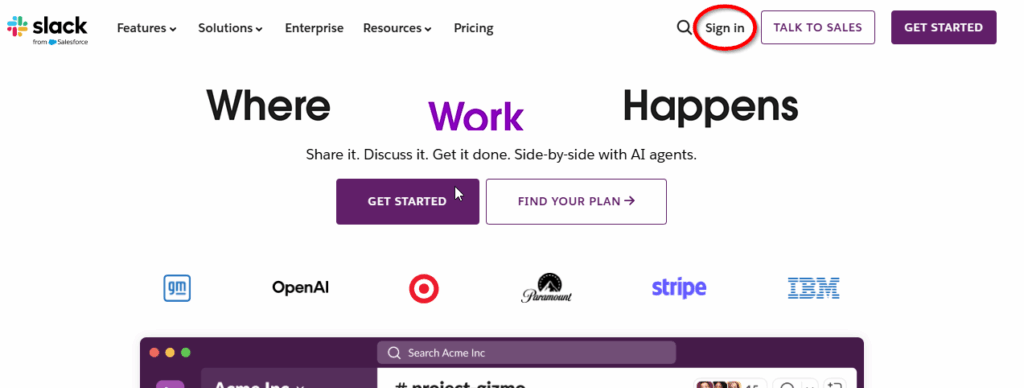
In Chrome, go to slack.com
Click on “Sign In” in upper right corner:
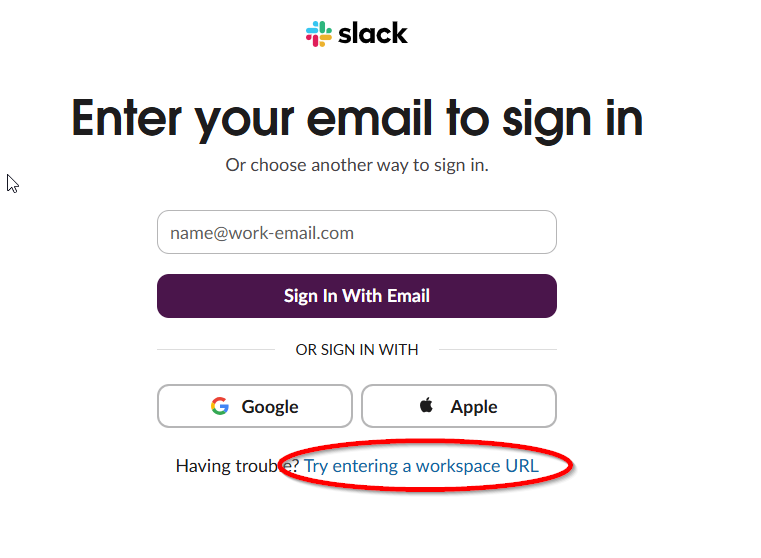
You may be presented with 1 of 3 possible screens. If you see the link for “Try entering a workplace URL”, click on it.
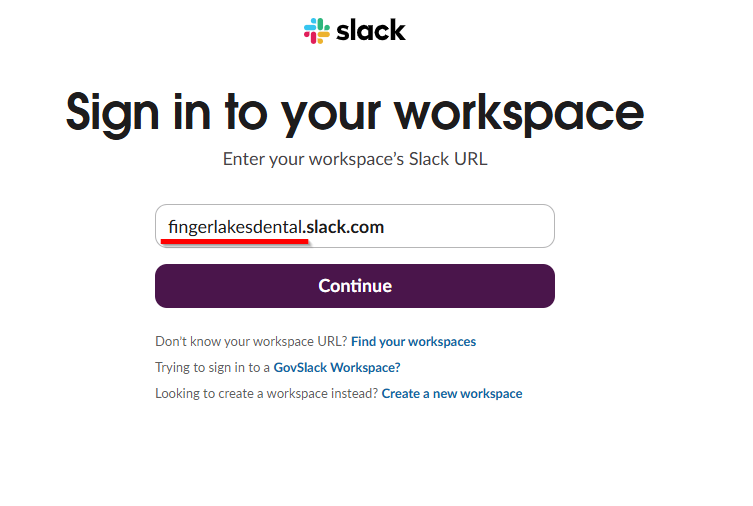
Enter “fingerlakesdental.slack.com” into the workspace box and click Continue:
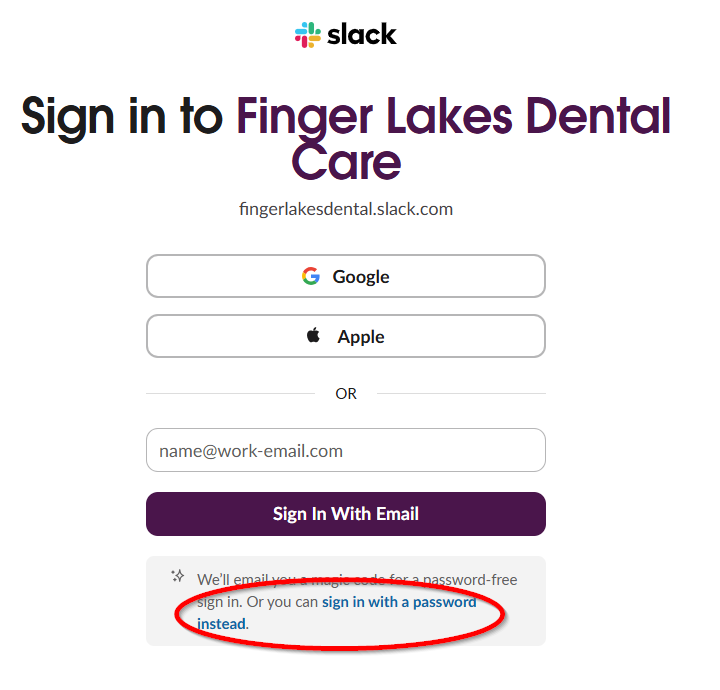
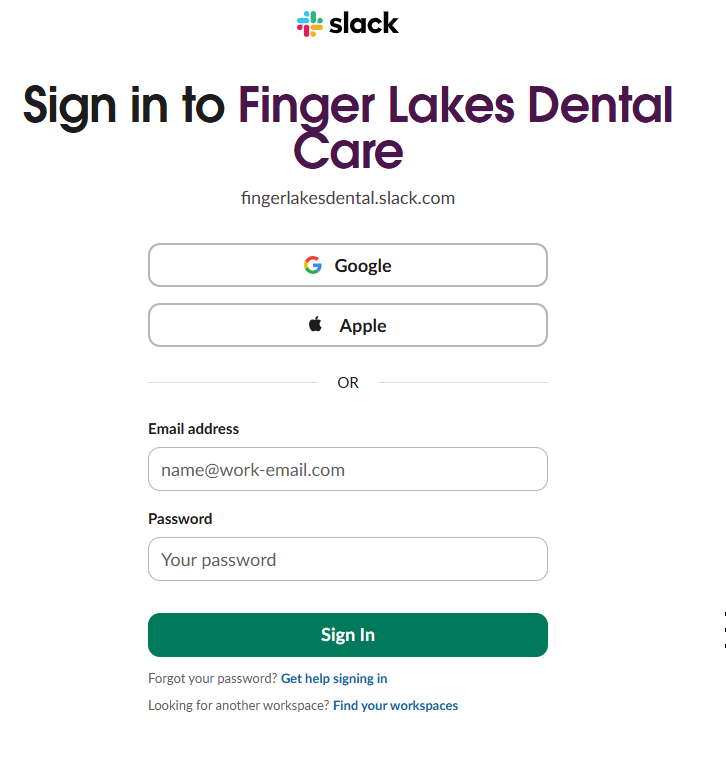
Enter your email address on the next screen, and it will email you a confirmation code to use. If you wish to use an email and password instead, click on the link at the bottom that says “sign in with a password instead”, and a password field will appear on the screen.
If you have any issues signing in, you can submit a ticket, or if you don’t have access to Slack on any device, have a coworker submit a ticket on your behalf.
Table of Contents